OpenData
1. Introduction
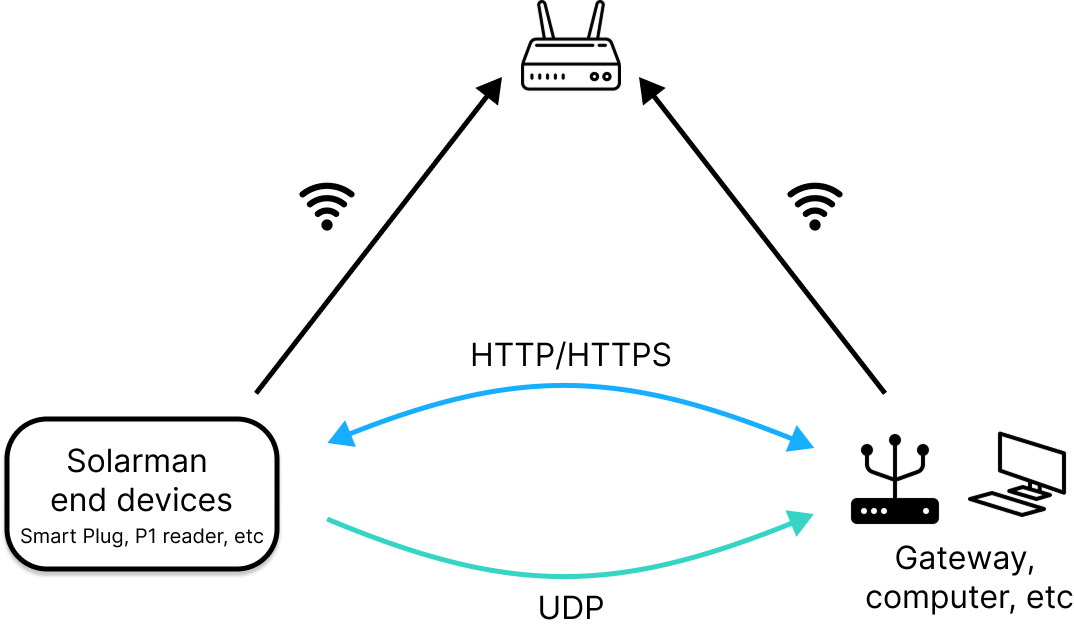
OpenData is a lightweight communication framework designed for WiFi-based Solarman IoT devices (such as smart plug, meters, P1 readers, etc.). Devices connect to the local network via WiFi, supporting both data push and external query response mechanisms.
Core Features
- Device Data Acquisition: Real-time retrieval of device basic information (model, firmware version, etc.) and measurement data.
- Device Configuration Update: Dynamic adjustment of device parameters and settings.
Use Cases
-
Push Device Data (UDP)
- Unencrypted: UDP broadcast to
255.255.255.255 - Device Key Encrypted: UDP broadcast to
255.255.255.255(Coming soon)
- Unencrypted: UDP broadcast to
-
Receive External Query Requests (HTTP/HTTPS)
- HTTP: No encryption/authentication, plaintext transmission
- HTTP + Digest: Digest authentication
- HTTPS: TLS/SSL encryption (Coming soon)
2. Preparation
1. Install Tools
- Network debugging tool (e.g., NetAssist): For receiving UDP broadcasts.
- Postman: For calling HTTP APIs to get device info or update configurations.
2. Enable API
Device API functionality is disabled by default and must be manually enabled before use.
3. Obtain IP Address
Choose one of the following four methods:
- Query via router admin interface
- View device details in Solarman Smart APP
- Check device info in Energy Ease
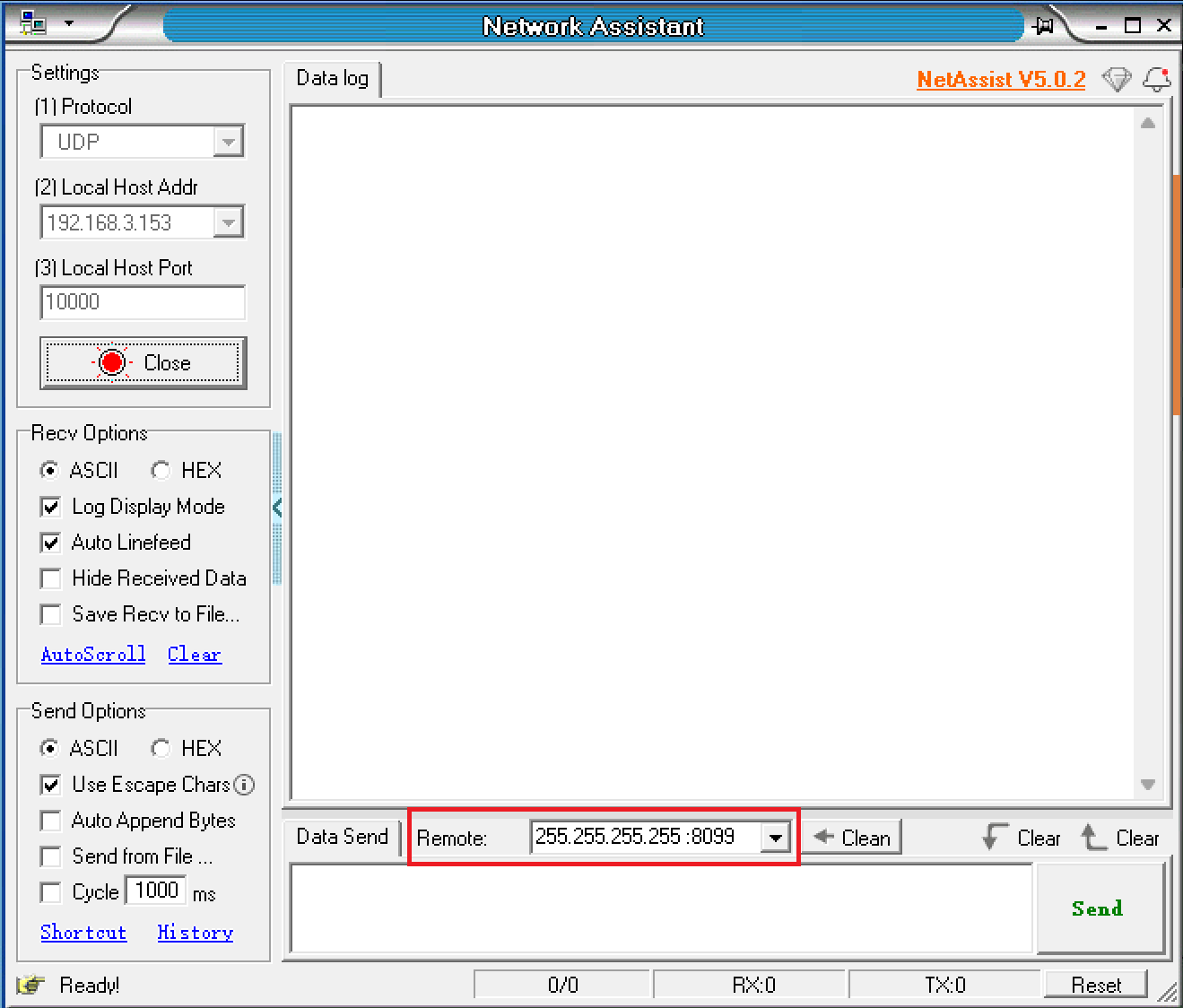
Obtain IP via UDP broadcast
-
Ensure the device and computer are on the same LAN.
-
Open the network debugging tool.
-
Select UDP protocol.

-
Select Local Host Address.

-
Set Port to 10000.

-
Click Open.

-
Set remote host to broadcast address: 255.255.255.255:8099.
-
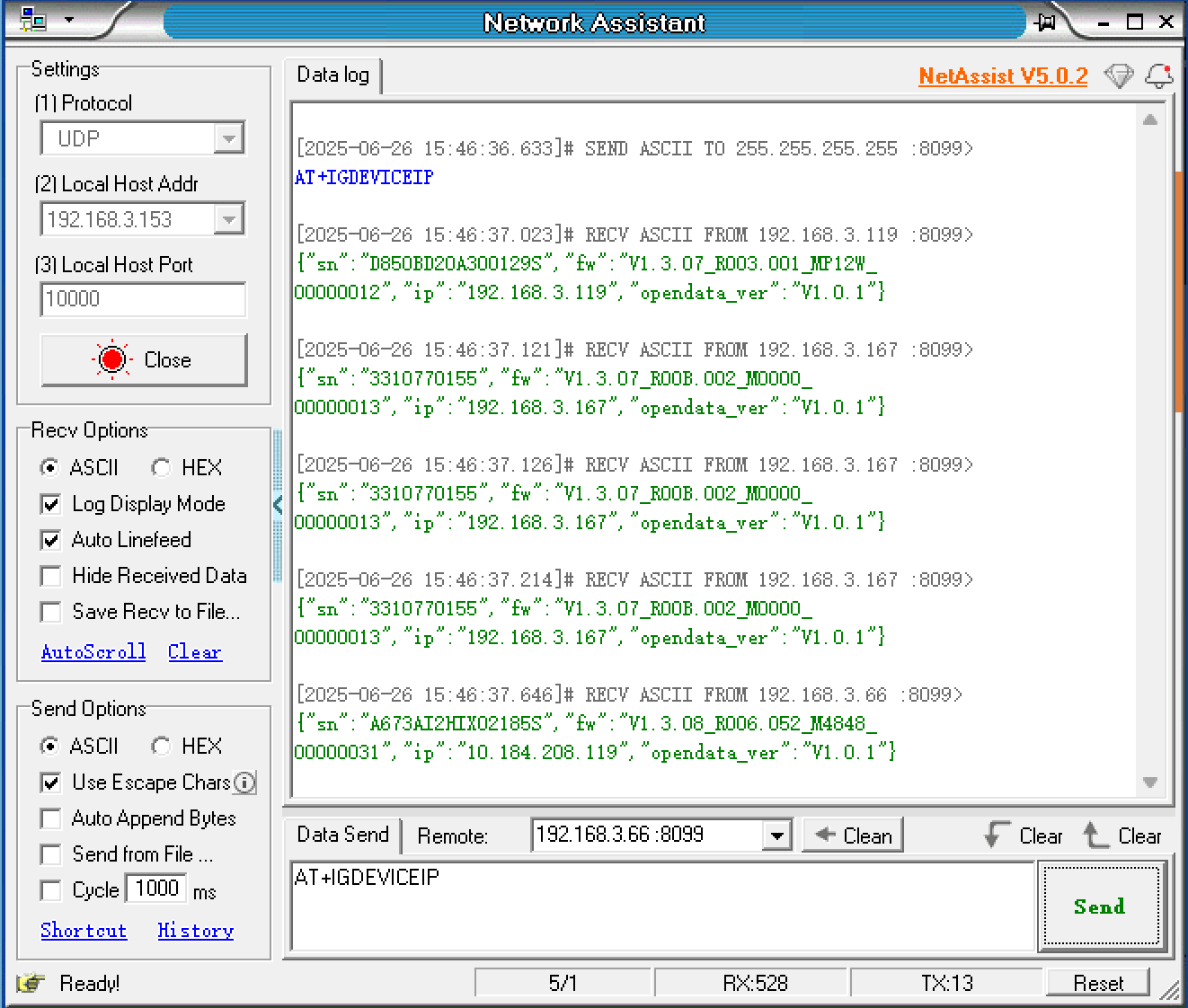
Enter AT command in message box: AT+IGDEVICEIP.

-
Click Send.
-
Solarman devices on the same LAN will reply with their IP and SN.
3. UDP Usage Guide
Enable Functionality
UDP is disabled by default and must be manually enabled.
Unencrypted UDP
For devices supporting UDP broadcast, receive UDP packets to obtain device information.
| Device | Broadcast Address & Port | Frequency (ms) |
|---|---|---|
| P1 Reader | Address: 255.255.255.255; Port: 8088 | 500 |
| Smart Plug | Address: 255.255.255.255; Port: 8088 | 500 |
| Meter | Address: 255.255.255.255; Port: 8088 | 200 |
Steps:
-
Ensure device and computer are on the same LAN.
-
Open network debugging tool.
-
Select UDP protocol.
-
Select your computer's IP address in the LAN.

-
Set local port to 8088.

-
Click Open to start listening.
-
Select packet display format: ASCII/Hex.

-
Received packets will display in the receive area.
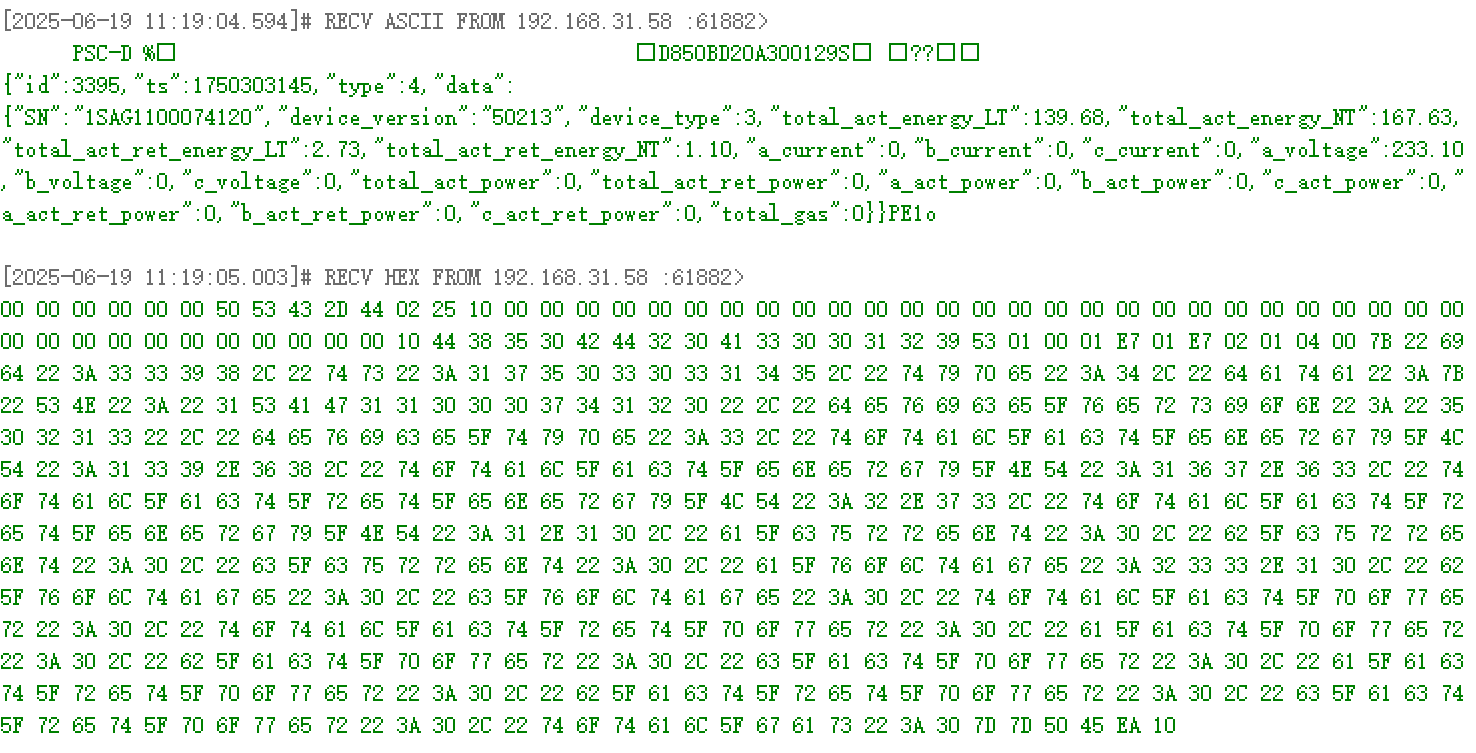
If no data is received, verify device and computer are on the same LAN and ensure firewall allows communication.
UDP Device Key Encryption
Coming soon
4. HTTP Usage Guide
Request Structure
Request Methods
- GET: Request specified resource from server.
- POST: Request server to perform an action.
Request Address
http://{IP_ADDRESS}:8080/rpc/{API}
where:
{IP_ADDRESS}: Device IP address.{API}: HTTP API to call.
Request Examples
- Get device info:
GET http://192.168.31.213:8080/rpc/Sys.GetConfig
- Modify device name:
POST http://192.168.31.213:8080/rpc/Sys.SetConfig?config={"device":{"hostname":"admin"}}
Digest Authentication
Digest authentication verifies user identity without transmitting plaintext passwords.
In HTTP+Digest mode, devices after first use or factory reset require default password change before using other APIs.
Change Password
-
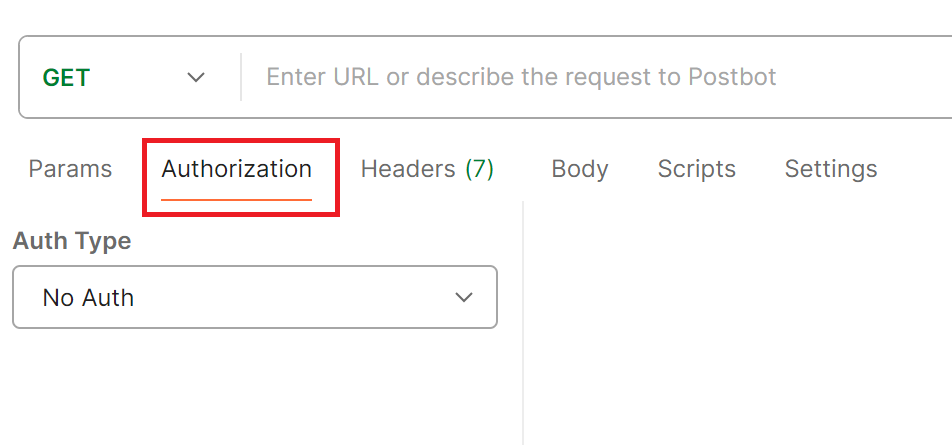
In Postman, select Authorization tab.
-
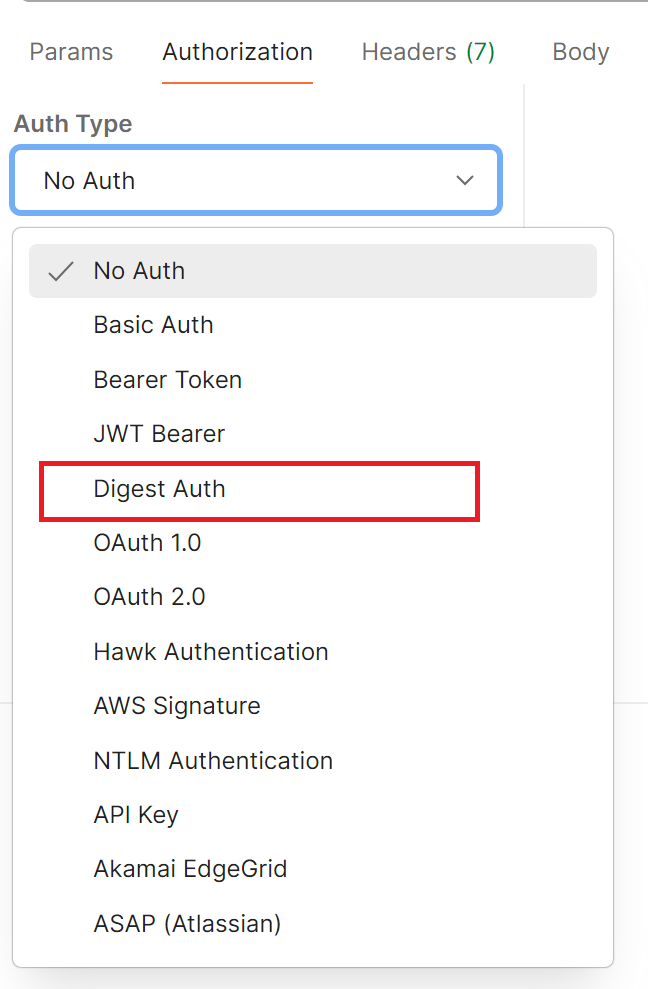
Select Digest Auth from Auth Type dropdown.
-
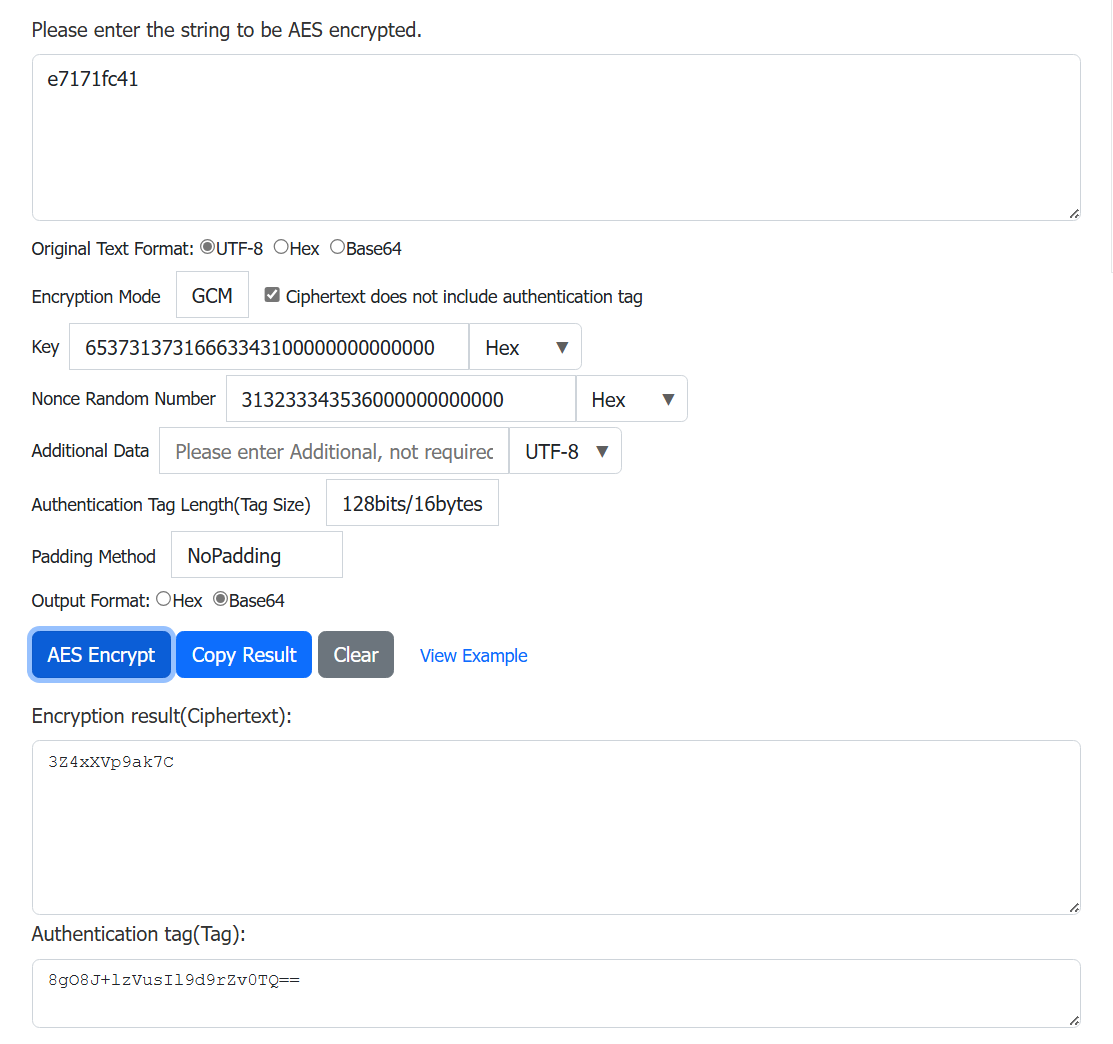
Use online AES tools to generate Base64-encoded password and tag:
- Required Tools:
- ASCII to Hex
- Hex to Base64
- AES_GCM Encryptor
- Parameters:
- Plaintext: New password
- Key: Current password (Hex format, pad with
00to 16 bytes). Example:e7171fc41→65373137316663343100000000000000 - Nonce: Random value (Hex format, pad with
00to 12 bytes). Example:123456→313233343536000000000000 - Padding: NoPadding
- Required Tools:
-
Authentication parameters:
Field Value Username Default: opendPassword Default device KEY Realm AES128-GCM generated Tag (Base64) Nonce Same random value used in AES Algorithm MD5 qop auth Nonce Count Random value Client Nonce Random value Opaque (Leave empty) -
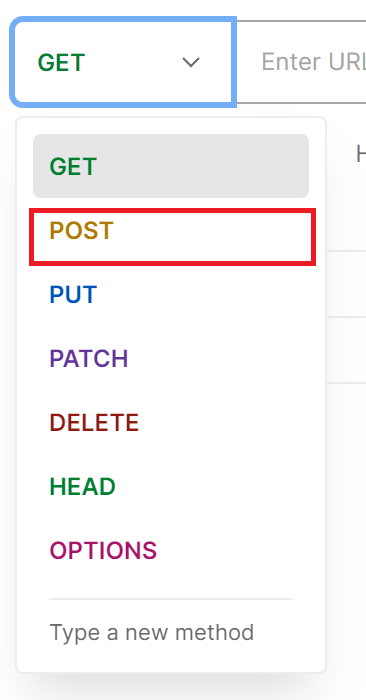
Select POST method.
-
Request address:
http://{IP_ADDRESS}:8080/rpc/User.SetConfig?config={"Password":"{PASSWORD}"}
where:
{IP_ADDRESS}:Device IP address.{PASSWORD}: AES128-GCM encrypted ciphertext (Base64).

- Click Send.
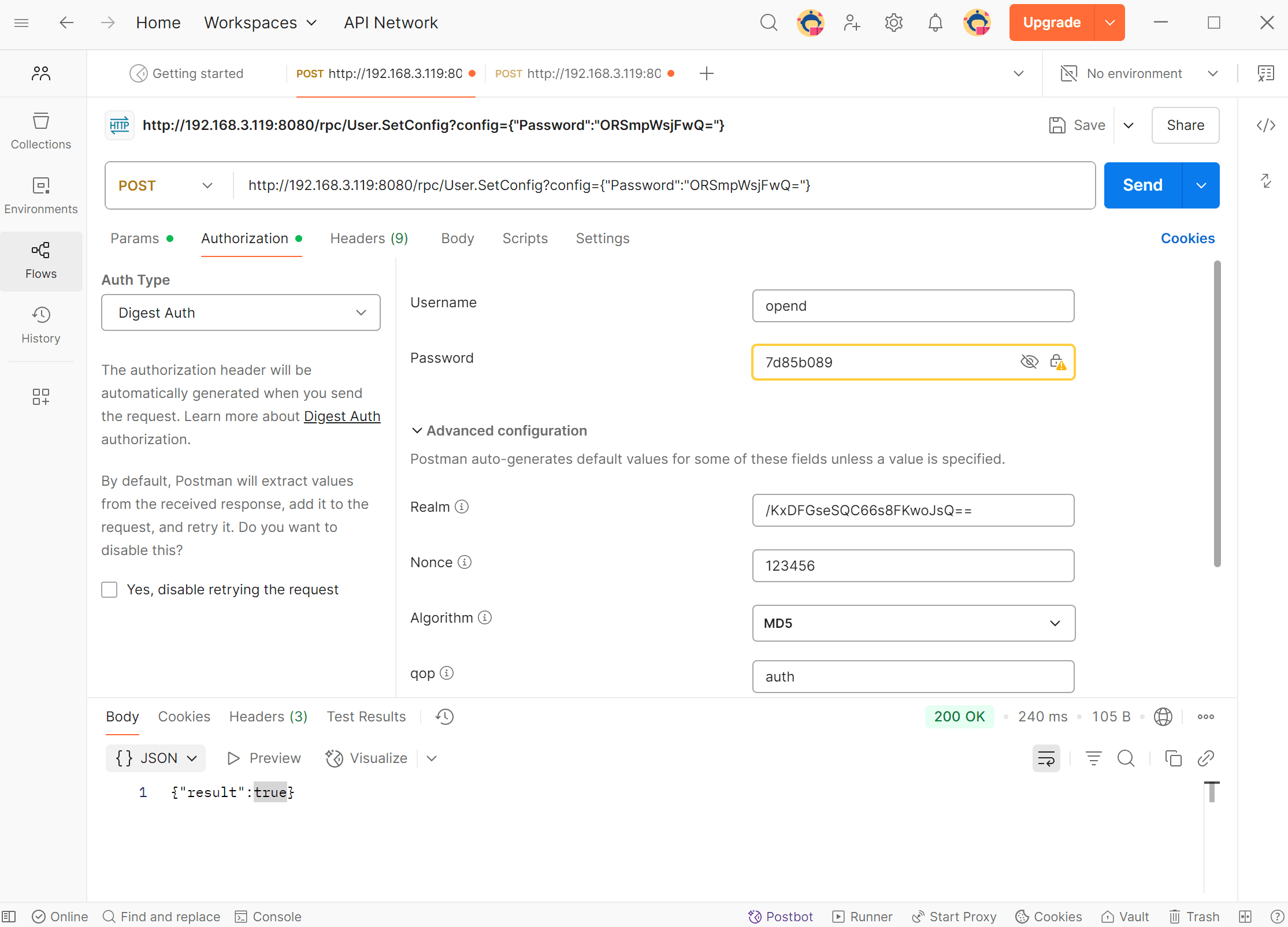
✅ Success
Returns
{"result": true}if password changed successfully.
Request Other APIs
- Select Authorization tab in Postman.
- Choose Digest Auth.
- Fill parameters:
| Field | Value |
|---|---|
| Username | opend |
| Password | New password |
| Realm | Random value |
| Nonce | Nonce from AES encryption |
| Algorithm | MD5 |
| qop | auth |
| Nonce Count | Random value |
| Client Nonce | Random value |
| Opaque | (Leave empty) |
HTTPS
Coming soon
Error Codes
| Code | Description | Explanation |
|---|---|---|
| 400 | Bad Request | Server cannot understand request format. |
| 401 | Unauthorized | Authentication required. Provide valid credentials. |
| 403 | Forbidden | Server refuses action (typically permission issue). |
| 404 | Not Found | Resource not found or deleted. |
| 405 | Method Not Allowed | Incompatible method (e.g., write operation on read-only resource). |
| 408 | Request Timeout | Server timed out waiting for request. Retry later. |
| 409 | Conflict | Request conflicts with current resource state (e.g., concurrent edits). |
| 410 | Gone | Resource permanently deleted. |
| 500 | Internal Server Error | Server encountered unexpected error. |
| 501 | Not Implemented | Server does not support requested method. |
| 502 | Bad Gateway | Invalid response received from upstream server. |
| 503 | Service Unavailable | Server temporarily overloaded or in maintenance. |
| 504 | Gateway Timeout | Upstream server response timeout. |
| 505 | HTTP Version Not Supported | Server does not support HTTP version in request. |
5. HTTP API
| Component | Description |
|---|---|
| Sys | Device model, firmware version, etc. |
| P1 | Read gas/electricity data from P1 meter reader. |
| Plug | Read power metrics and control smart sockets. |
Sys
Get Device Info
- Request Example
GET http://192.168.31.213:8080/rpc/Sys.GetConfig
- Response Example
{
    "device": {
        "hostname": "admin",
        "timezone": 480,
        "type": "",
        "sn": "2730890019",
        "mac": "E8FDF8DD9A76",
        "fw": "LSW3_01_E030_SS_00_00.00.00.03",
        "time": "2024-11-26 19:14:23",
        "time_stamp": 1732648463,
        "run_time": 839
    }
}
Method: Sys.GetConfig
- Returns
Parameter Type Description device object See Config table.
Set Device Name/Timezone
- Request Example
POST http://192.168.31.213:8080/rpc/Sys.SetConfig?config={"device":{"hostname":"admin"}}
- Response Example
{"result": true}
Method: Sys.SetConfig
- Parameters
Parameter Type Description config object Only hostname and timezone are writable. See Config table.
- Returns
Parameter Type Description result bool true: success,false: failure.
Config
| Parameter | Type | Description |
|---|---|---|
| device | object | Device config. See below. |
device
| Parameter | Type | Description | R/W |
|---|---|---|---|
| hostname | string | Device name | R/W |
| timezone | int | Timezone | R/W |
| type | string | Device model | R |
| sn | string | Serial number | R |
| mac | string | MAC address | R |
| fw | string | Firmware version | R |
| time | string | Current time (YYYY-MM-DD HH:mm:ss) | R |
| time_stamp | int | Unix timestamp | R |
| run_time | int | Uptime (seconds) | R |
P1
Get Meter Data (JSON)
- Request Example
GET http://192.168.31.213:8080/rpc/P1.JsonData
- Response Example
{
    "SN": "E0036003765928016",
    "Device_Version ": "50",
    "Device_Type": 0,
    "Electricity delivered to client_low tariff": 53754.58,
    "Electricity delivered to client_normal tariff": 9818.93,
    "Electricity delivered by client_low tariff": 53754.58,
    "Electricity delivered by client_normal tariff": 9818.93,
    "AC_Phase-A_Current ": 12,
    "AC_Phase-B_Current": 0,
    "AC_Phase-C_Current": 0,
    "AC_Phase-A_Voltage": 237,
    "AC_Phase-B_Voltage": 237,
    "AC_Phase-C_Voltage": 236,
    " Actual electricity power delivered +P ": 0,
    " Actual electricity power received -P ": 2.94,
    "Instantaneous active power L1 +P": 0,
    "Instantaneous active power L2 +P": 0,
    "Instantaneous active power L3 +P": 0,
    "Instantaneous active power L1 -P": 2.95,
    "Instantaneous active power L2 -P": 0,
    "Instantaneous active power L3 -P": 0
}
Method: P1.JsonData
- Returns: JSON-formatted meter data.
Parameter Description Unit SN Meter SN - Device_Version Meter version - Device_Type Meter model - Electricity delivered to client_low tariff Forward energy (low tariff) kWh Electricity delivered to client_normal tariff Forward energy (normal tariff) kWh Electricity delivered by client_low tariff Reverse energy (low tariff) kWh Electricity delivered by client_normal tariff Reverse energy (normal tariff) kWh AC_Phase-L1_Current Phase A current A AC_Phase-L2_Current Phase B current A AC_Phase-L3_Current Phase C current A AC_Phase-L1_Voltage Phase A voltage V AC_Phase-L2_Voltage Phase B voltage V AC_Phase-L3_Voltage Phase C voltage V Actual electricity power delivered +P Total forward active power kW Actual electricity power received -P Total reverse active power kW Instantaneous active power L1 +P Purchased power L1 kW Instantaneous active power L2 +P Purchased power L2 kW Instantaneous active power L3 +P Purchased power L3 kW Instantaneous active power L1 -P Grid feed-in power L1 kW Instantaneous active power L2 -P Grid feed-in power L2 kW Instantaneous active power L3 -P Grid feed-in power L3 kW Total Gas Consumption Total gas consumption m³
Get Raw Meter Data
- Request Example
GET http://192.168.31.213:8080/rpc/P1.GetData
- Response Example
{
    3:0.2.8(50)
    0-0:1.0.0(181106140429W)
    0-0:96.1.1(31333631353032362020202020202020)
    1-0:1.8.1(10830.511*kWh)
    1-0:1.8.2(002948.827*kWh)
    1-0:2.8.1(001285.951*kWh)
    1-0:2.8.2(002876.514*kWh)
    0-0:96.14.0(0002)
    1-0:1.7.0(21.100*kW)
    1-0:2.7.0(00.000*kW)
    0-0:96.7.21(00006)
    0-0:96.7.9(00003)
    1-0:99.97.0(1)(0-0:96.7.19)(180529135630S)(0000002451*s)
    1-0:32.32.0(00003)
    1-0:52.32.0(00002)
    1-0:72.32.0(00002)
    1-0:32.36.0(00001)
    1-0:52.36.0(00001)
    1-0:72.36.0(00001)
    0-0:96.13.0()
    1-0:32.7.0(236.0*V)
    1-0:52.7.0(232.6*V)
    1-0:72.7.0(235.1*V)
    1-0:31.7.0(002*A)
    1-0:51.7.0(000*A)
    1-0:71.7.0(000*A)
    1-0:21.7.0(00.000*kW)
    1-0:41.7.0(00.033*kW)
    1-0:61.7.0(00.132*kW)
    1-0:22.7.0(00.676*kW)
    1-0:42.7.0(00.000*kW)
    1-0:62.7.0(00.000*kW)
    0-1:24.1.0(003)
    0-1:96.1.0(4730303339303031373030343630313137)
    0-1:24.2.1(210606140010W)(02569.646*m3)
    !1F28
}
Method: P1.GetData
- Returns: Raw meter data.
Plug
Get Power Consumption
- Request Example
GET http://192.168.31.213:8080/rpc/Plug.GetData
- Response Example
{
    "voltage": 230,
    "electric_current": 0,
    "positive_active_energy": 1.730654,
    "reverse_active_energy": 0.000000,
    "power": 1.217517
}
Method: Plug.GetData
- Returns
Parameter Type Description Unit voltage int Voltage V electric_current int Current A positive_active_energy float Forward active energy kWh reverse_active_energy float Reverse active energy kWh power float Active power W
Get Plug Status
- Request Example
GET http://192.168.31.213:8080/rpc/Plug.GetStatus
- Response Example
{"switch_status": "on"}
Method: Plug.GetStatus
- Returns
Parameter Type Description switch_status string on: open,off: closed
Set Plug Status
Request Example
POST http://192.168.31.213:8080/rpc/Plug.SetStatus?config={"switch_status":"on"}
- Response Example
{"result": true}
Method: Plug.SetStatus
- Parameters
Parameter Type Description config object Sets socket status. See Config.
- Returns
Parameter Type Description result bool true: success,false: failure.
Config
| Parameter | Type | Description | Unit | R/W |
|---|---|---|---|---|
| voltage | int | Voltage | V | R |
| current | int | Current | A | R |
| Electricity delivered to client | float | Forward active energy | kWh | R |
| Electricity delivered by client | float | Reverse active energy | kWh | R |
| Active power | float | Active power | W | R |
| switch_status | string | on: open, off: closed | - | R/W |
Meter
Get Meter Data (JSON)
- Request Example
GET http://192.168.31.213:8080/rpc/Meter.JsonData
- Response Example
{
    "SN": "3310500113",
    "voltage": 229.87,
    "current": 0.66,
    "active power": 133.50,
    "apparent power": 209.60,
    "reactive power": -29.80,
    "power factor": 0.63,
    "frequency": 50.03,
    "total_act_energy": 3.53,
    "total_act_ret_energy": 0.18
}
Method: Meter.JsonData
- Returns: JSON-formatted meter data.
Single-phase Meter JSON Data
Parameter Description Unit SN Device SN - current Current A voltage Voltage V frequency AC frequency Hz power factor Power factor - active Power Forward/Reverse active power W apparent power Forward/Reverse apparent power W reactive power Forward/Reverse reactive power W total_act_energy Total forward active energy kWh total_act_ret_energy Total reverse active energy kWh
6. Devices
P1 Reader
The P1 Reader (P1-2W) connects directly to a single P1 meter via RJ12 interface, continuously collecting meter status and electricity data for long-term monitoring. It transmits data over WiFi to local/cloud platforms, visualizing real-time status and historical trends.
Supported Components:
- Sys
- P1
Smart Plug
The Smart Plug (SP-2W-EU) supports home energy monitoring with bidirectional metering and remote control. It uploads energy data via WiFi, allowing users to remotely control appliances and monitor usage via apps.
Supported Components:
- Sys
- Plug
Meter
The meter is designed for residential/small commercial bidirectional metering. It is installed on DIN rails (35mm) using split-core CTs and uploads data via WiFi/Ethernet for detailed energy analysis.
Models (MR1: Single-phase, MR3:Three-phase):
- MR1-D5-WR
- MR1-D5-W
Supported Components:
- Sys
- Meter